| Audience | Platform admins |
| Prerequisites | Completed schema setup so there are resources to trace. |
Usage shows which resources across your workspace depend on a given model, column, or audience, so you can see what a change would affect before you make it.
Overview
As a workspace grows into hundreds of connected resources, it gets hard to know what depends on what, and understand the impact of making a change. Usage traces those dependencies down to the column level, so you can understand how a resource is used and what a change to it would affect.
You open Usage from the resource you're about to change. It answers one question: what else in the workspace depends on this?
Use it to:
- plan a change or deletion without breaking an audience, sync, or journey that's still in use
- find models, columns, and audiences that nothing depends on, so you can clean up your workspace
- check where a column or audience is already used when you're not sure you're building on the right one
Usage covers dependencies inside Hightouch. It doesn't trace upstream to your warehouse tables or downstream to individual fields in your destinations.
Where you see Usage
Usage appears on the resources you're most likely to change, so you can check it without leaving your workflow.
| Resource | Where to find it |
|---|---|
| Audience | The Usage tab on the audience. |
| Schema model | The Usage tab on the model. |
| Reverse ETL model | The Usage tab on the model. |
| Column | The Usage column on the model's Columns tab. Select a count to open the drawer. |
| Trait | The Usage tab on the trait. |
Other resource types, such as syncs and journeys, appear as dependents inside these views even though they don't yet have their own Usage tab.
How to understand usage
Direct and indirect dependents
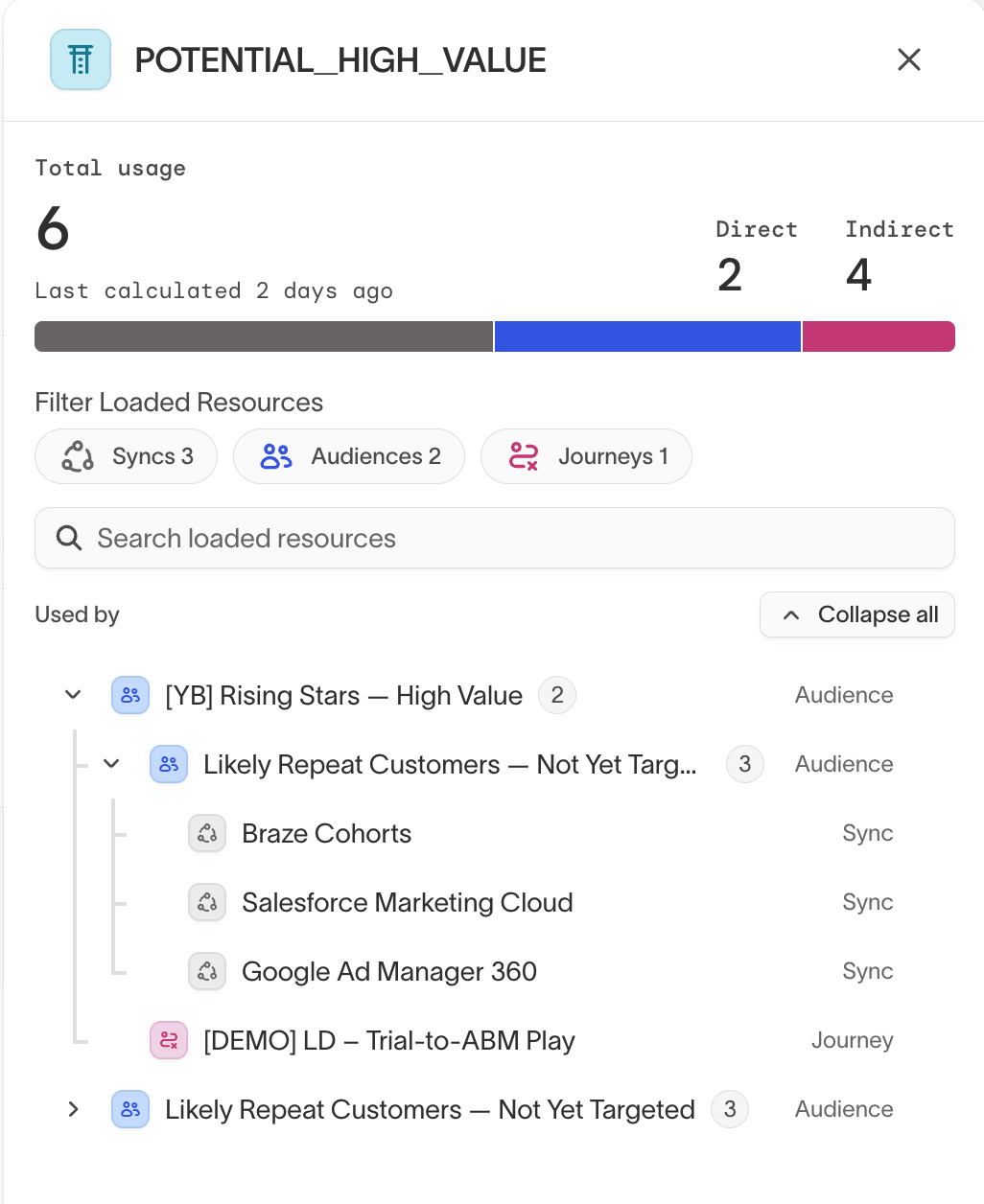
Usage groups what depends on a resource by how many steps, or hops, away it is. Total usage counts every distinct resource that depends on the one you're viewing, direct and indirect combined. Each resource is counted once. The resource-type counts show how many audiences, syncs, journeys, and other resources depend on it.
For a column that's used in an audience that's then synced, the chain reads:
column → audience (direct) → sync (indirect)
The list expands one level at a time, so open a resource to see what depends on it in turn.
When you expand everything, you may see the same resource, or the same chain of dependencies, more than once. That happens when a resource is reachable through more than one path, for example a column used directly by a sync and also through a trait that the same sync references. Each resource is still counted once in the totals.
- Direct dependents reference the resource itself, one hop away. For a column, that's an audience that filters on it or a sync that maps it.
- Indirect dependents reach the resource through another resource, two or more hops away. A sync of that audience is indirect: it doesn't reference the column itself, but it depends on it through the audience.
Filter by resource type
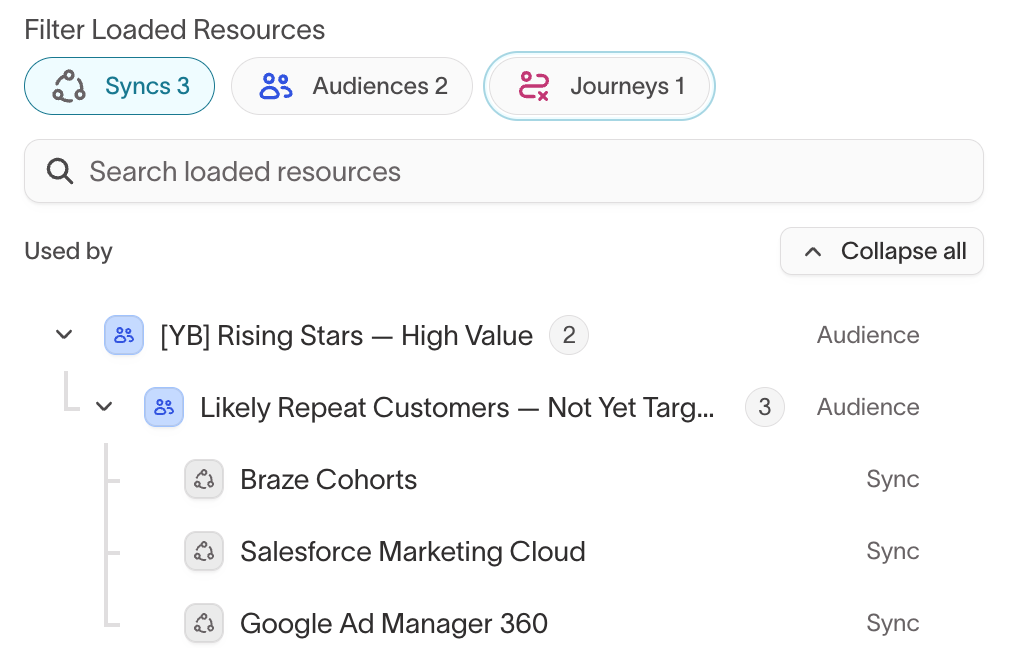
Select a resource type to narrow the list to dependents of that type. Filtering keeps the resources that connect the chain: if you filter to Syncs and a sync depends on the resource through an audience, the audience still shows, because it's part of the path to that sync.
How current it is
Usage is calculated when you open it, then cached so it loads quickly the next time. The first calculation for a resource can take a moment, especially in a large workspace.
When you change a resource, Usage recalculates the next time you open it. For up to two minutes after a change it can show your last completed result while it recalculates, and tells you it's recalculating. If a recent change isn't reflected, wait a moment and reopen the view.
A deleted resource stays in Usage as a broken dependency until the next calculation drops it, so you can still see where it was referenced.
What Usage tracks
Usage tracks dependencies between the resources you use to model and activate your data:
- schema models (parent, related, and event models) and the columns within them
- reverse ETL models and their columns
- audiences
- syncs and sync templates
- journeys
- traits and trait templates
- subsets
- native delivery campaigns
- AI Decisioning (AID) resources
What Usage doesn't track
Usage doesn't include these, so changing one won't appear as a dependency:
- warehouse tables and columns upstream of Hightouch
- charts, metrics, dashboards, and reports
- event sources, event syncs, and event destinations
- identity resolution (IDR) graphs
- audience templates
Export usage
Usage doesn't have a self-serve export today. If you need the dependency data offline, for example to plan a large migration or cleanup, your Hightouch account team can generate a full-workspace export of the usage graph. Reach out to your Hightouch representative or to request one.
Troubleshooting
Usage never finishes calculating
Cause: The first calculation for a large workspace is still running, or a rebuild is stuck.
Resolution: Wait a moment and reopen the view. Large workspaces take longer to calculate. If it doesn't resolve, contact your Hightouch account team.
A count looks lower than expected
Cause: Some resource types aren't tracked yet (see What Usage doesn't track), so a dependency that runs only through an untracked resource isn't counted.
Resolution: Confirm the dependency runs through tracked resource types.
A resource you deleted still appears
Cause: Usage recalculates on a short delay, so a recently deleted resource can linger as a broken dependency.
Resolution: Wait a moment and reopen the view. The deleted resource drops out on the next rebuild.