| Audience | How you'll use this article |
|---|---|
| Marketing | Understand what event data is used for and how it supports activation, personalization, and experimentation. |
| Data teams | Learn how events are collected, structured, stored, and reused across analytics and activation workflows. |
| Engineering | Understand the event model, ingestion paths, and how Events connects to your data architecture. |
Hightouch Events collects customer behavior from websites, mobile apps, and backend systems, then stores that data in your warehouse. Teams can use the same event data to analyze behavior, build audiences, trigger journeys, and power real-time workflows.
Overview
Hightouch Events lets you collect customer behavior from your website, app, or backend systems and store it in your warehouse. Once events are flowing, you can use that data to build audiences, trigger journeys, measure campaigns, and power real-time personalization.
This page explains what an event is, how Events works, and how it connects to your other tools.
What an event is
An event is a record of a single customer action, such as viewing a product, completing a purchase, or signing up. Every event carries three things:
- Identity — who acted, as an
anonymousId(a device or browser, tracked before someone is known) and, once known, auserId. - Properties or traits — the details. Properties describe the action (a cart total). Traits describe the person (an email, a plan).
- Context — metadata the SDK collects automatically, such as device, page URL, or campaign parameters.
Events come in five types — identify, track, page, screen, and group — each for a different kind of action. See event types and payload structure for the full field reference.
How an event moves through Hightouch
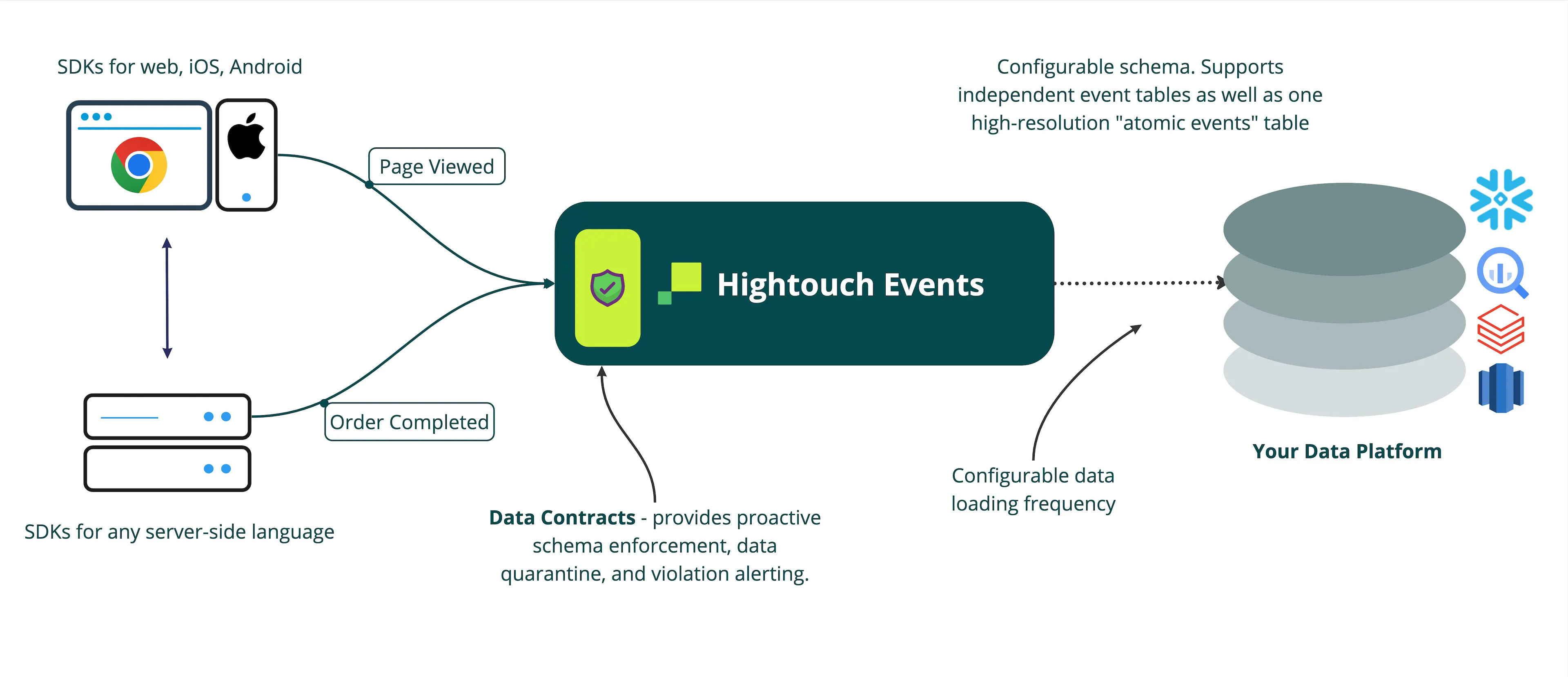
An event moves through three stages. Knowing where each happens tells you what you own and what Hightouch handles.
- You send the event. You instrument your app, site, or backend with a Hightouch SDK, the HTTP API, or a streaming source like Kafka or Google Pub/Sub. This is your code, and your data quality starts here.
- Hightouch validates and structures it. Hightouch checks the event against any data contract you've defined, optionally transforms it with a function, and puts it into a consistent shape.
- Hightouch delivers it. Hightouch writes the event to your warehouse, streams it to downstream tools, or both.
You own the instrumentation and the warehouse. Hightouch owns receiving, validating, structuring, and delivering.
Your warehouse is the source of truth
Hightouch writes events into your own warehouse as tables — identifies, tracks, pages, screens, and groups — and new fields you send become new columns automatically. Events doesn't keep a separate copy of your customer profiles. Your warehouse holds the event data and is the source of truth; other Hightouch products read from it rather than from a separate store.
Because your tables mirror the data you send, consistent event names, property names, and types matter — the warehouse reflects your input rather than cleaning it. See Warehouse schema for the table reference.
If you're coming from a tool that stored and served customer profiles for you, this is the largest shift to plan for. The logic that lived in that tool moves to your warehouse: Identity Resolution unifies a person's identifiers into one resolved identity, and Customer Studio builds traits and audiences on top.
Core features
Collect events from your apps and systems
Event sources are where events come from. Hightouch provides SDKs for browser, iOS, Android, Node.js, and other platforms, plus an HTTP API for server-side ingestion and connectors for streaming platforms like Kafka, Google Pub/Sub, and Amazon SQS.
Send events to your warehouse and tools
Event destinations are where events go. You can write events to your warehouse for analytics and modeling, or stream events to downstream tools like your email platform, CRM, or analytics service.
Route events between sources and destinations
Event syncs define how events move between sources and destinations — which events are sent, how they're filtered, and how data is mapped.
Enforce schemas and transform events
Use data contracts to enforce event schemas and catch violations before bad data reaches your warehouse. The Events CLI generates typed SDK wrappers from those contracts so instrumentation is checked in your editor. Use functions to update events before they reach a destination — for example, rename properties, filter events, or add fields to the event data.
Get started
Events is usually set up by engineering and data teams. Start with Plan your implementation to make the decisions every setup depends on — your event model, identity, contracts, coverage, and delivery. Then follow the path that matches your situation:
- Migrating from another event collection tool, such as Segment or RudderStack? Most teams adopting Events are. The Migration guide keeps your existing data flowing while you switch: you run both tools in parallel, confirm the new data matches, and cut over downstream tools deliberately.
- Implementing fresh, with no existing event collection? Follow the build steps in Plan — connect your sources, send events to your warehouse, define contracts, validate, and monitor — with no parallel run or cutover to manage.
When to use Events
Use Events when you need to collect behavioral data from your app, website, or backend systems and store it in your warehouse. For activating warehouse data that's already been collected and modeled, use Reverse ETL or Customer Studio instead.
| Scenario | Recommended approach |
|---|---|
| Collect behavioral data from websites, apps, or backend systems | Events |
| Write event data to your warehouse for analytics and modeling | Events warehouse destinations |
| Stream events to downstream tools in real time | Events event streaming |
| Enforce event schemas and catch data quality issues | Events data contracts |
| Build audiences using behavioral event data | Customer Studio — uses Events data as audience filters |
| Respond to user behavior during an active session | Real-Time — evaluates audience membership using live events |
| Sync modeled warehouse data to business tools | Reverse ETL |
Use Events with other Hightouch products
Events captures what customers do on your site, app, and backend, and writes it to your warehouse. From there, your behavioral data moves through the rest of the Hightouch pipeline, with your warehouse at the center:
- Collect — Events captures behavior from your app, website, and backend through SDKs, the HTTP API, and streaming sources like Kafka, Google Pub/Sub, and Amazon SQS.
- Store — Events writes that behavior to your warehouse in a consistent schema. The warehouse is the source of truth for every stage that follows.
- Unify — Identity Resolution links a person's identifiers across devices, sessions, and sources into one resolved identity.
- Model — Customer Studio builds traits, audiences, and journeys on that data, without SQL.
- Activate — send the result to your tools with Reverse ETL, evaluate it live with Real-Time Personalization, or optimize per person with AI Decisioning.
You don't need every stage. Events plus your warehouse already gives you queryable behavioral data for analytics; identity unification, modeling, and activation layer on as you need them. For time-sensitive cases, Events can also stream events straight to a destination, bypassing the warehouse round trip.
Permissions
Access to Events resources is controlled through custom roles. Admins can configure Events-specific grants in the Events tab of the custom role builder, including workspace-level creation grants (for creating new event sources, destinations, contracts, and functions) and per-resource grants (for managing individual resources).
Events permissions require Permissions V2. To create or manage an event sync, users need permissions on both the event source and the event destination.
See Roles for the full list of Events grants.