| Audience | Marketers, data teams |
| Prerequisites |
Coupon assignment gives each audience member a unique value — such as a single-use coupon code — inside a journey, then makes it available to sync to your destinations.
What coupon assignment does
Coupon assignment matches one available coupon row to each member of an audience inside a journey. The assigned coupon becomes a journey variable that you can use in messages or syncs.
For example, if your audience has 1,000 members and your coupon table has 1,000 available codes, Hightouch assigns one code to each member. Each member receives a different code, such as SUMMER10-X7Q2.
Hightouch assigns codes that already exist in your warehouse. It doesn't generate coupon codes, and it doesn't assign coupons to people outside the audience that enters the journey.
When to use coupon assignment
Use coupon assignment when all of the following are true:
- Each audience member needs a unique value, such as a single-use coupon code.
- The values come from a shared dataset, such as a table of codes from your coupon or commerce system.
- You want to assign values only to members of a specific campaign or journey.
If every member should receive the same value, such as SAVE20, use a Set variable tile instead. Coupon assignment is for one-per-member values.
1. Prepare the coupon table
Create a table in your warehouse that contains the coupons you want Hightouch to assign. Your coupon or commerce system must create the codes first; Hightouch only assigns existing values.
A coupon table usually includes these columns:
| Column | Example | What it is used for |
|---|---|---|
coupon_id | SUMMER26-000001 | Unique row identifier. Use this as the model's primary key. |
coupon_code | SUMMER10-X7Q2 | The unique value assigned to an audience member. |
campaign_id | summer_winback_2026 | Separates one coupon pool from another campaign's pool. |
status | available | Identifies codes that can still be assigned. |
expiration_date | 2026-09-30 | Identifies codes that should not be assigned after a date. |
discount_amount | 10.00 | Optional information to pass to a destination. |
Add any other metadata your messages need, such as minimum_purchase_amount or currency.
Build a model that normalizes these fields and returns only available, non-expired codes. Keep fields such as campaign_id and region in the model if you want to filter the coupon pool in the journey.
This Snowflake example creates that model:
SELECT
NULLIF(TRIM(TO_VARCHAR(coupon_id)), '') AS coupon_id,
NULLIF(TRIM(TO_VARCHAR(coupon_code)), '') AS coupon_code,
NULLIF(TRIM(TO_VARCHAR(campaign_id)), '') AS campaign_id,
TRY_TO_DATE(TO_VARCHAR(expiration_date)) AS expiration_date,
TRY_TO_DECIMAL(TO_VARCHAR(discount_amount), 10, 2) AS discount_amount,
UPPER(NULLIF(TRIM(TO_VARCHAR(region)), '')) AS region
FROM RAW.MARKETING.COUPON_POOL
WHERE NULLIF(TRIM(TO_VARCHAR(coupon_code)), '') IS NOT NULL
AND LOWER(status) = 'available'
AND TRY_TO_DATE(TO_VARCHAR(expiration_date)) >= CURRENT_DATE();
2. Validate the coupon data
Before you add the model to a journey, check that the assignment column contains unique values and that the pool is large enough for your audience.
Check for duplicate coupon codes
The assignment column must contain unique values. If two rows contain the same code, correct the source data. Don't hide duplicates with ROW_NUMBER() because that can cause the same code to be assigned more than once.
This query should return zero rows:
SELECT coupon_code, COUNT(*) AS code_count
FROM RAW.MARKETING.COUPON_POOL
WHERE coupon_code IS NOT NULL
GROUP BY coupon_code
HAVING COUNT(*) > 1;
Check the available inventory
Make sure each coupon pool contains at least as many available codes as the number of audience members who will use it. If the pool is smaller than the audience, Hightouch fails the journey instead of assigning coupons to only part of the audience.
This query shows the number of available codes in each campaign pool:
SELECT campaign_id, COUNT(*) AS available_codes
FROM RAW.MARKETING.COUPON_POOL
WHERE LOWER(status) = 'available'
  AND expiration_date >= CURRENT_DATE()
GROUP BY campaign_id;
Compare the result with the size of the audience that will use each pool. If you filter by more than campaign_id, include those filters when you calculate the inventory.
3. Add the coupon model to your schema
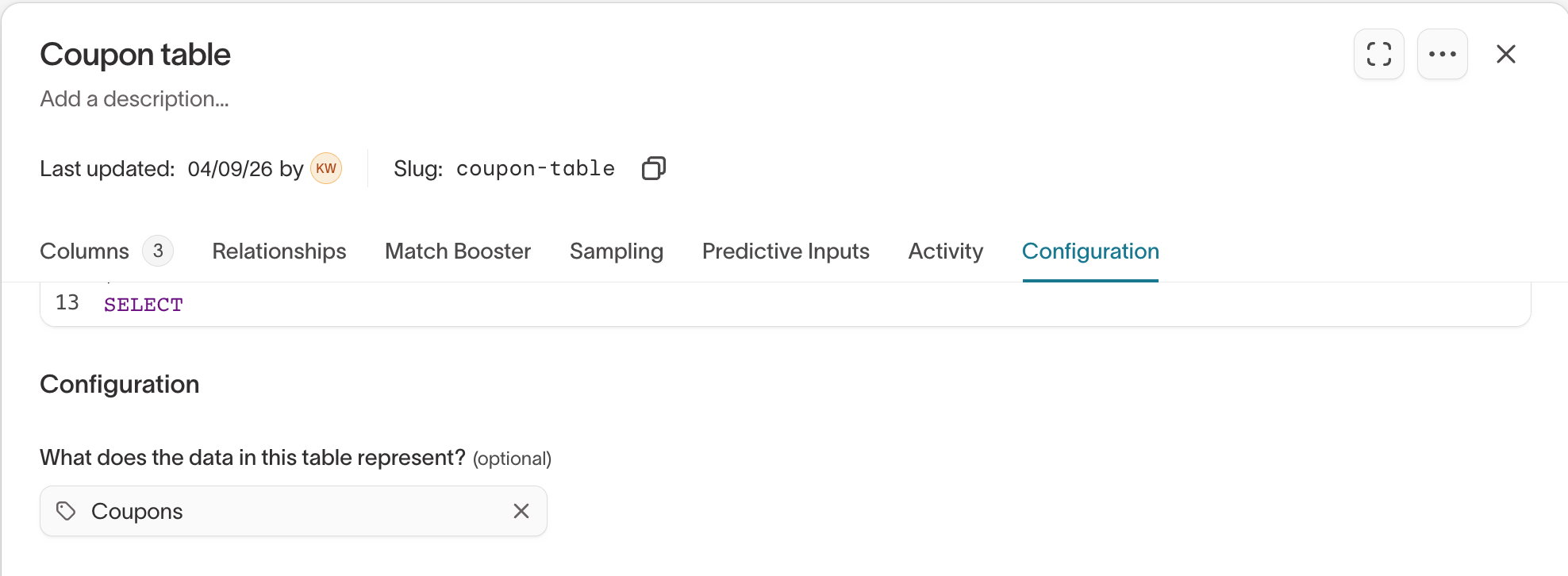
Add the coupon table or SQL model to your Customer Studio schema. A coupon model is the source of the values Hightouch can assign; it does not contain the member-to-coupon assignments yet.
- Go to Customer Studio > Schema.
- Create a parent model from your coupon table or SQL model.
- Set the model's data type to Coupons. This makes the model available in the Assign coupon step.
- Set the primary key to a unique row identifier, such as
coupon_id. - Save the model and confirm that the preview shows the expected codes and columns.
The coupon model must use the same source as the journey's parent model. It contains the pool of unassigned values. Hightouch creates the member-to-coupon association when a member reaches the Assign coupon step.
4. Set up the audience and journey
Build the audience for your campaign, then create a journey that uses this audience as its entry. Only members who enter through this audience receive a coupon.
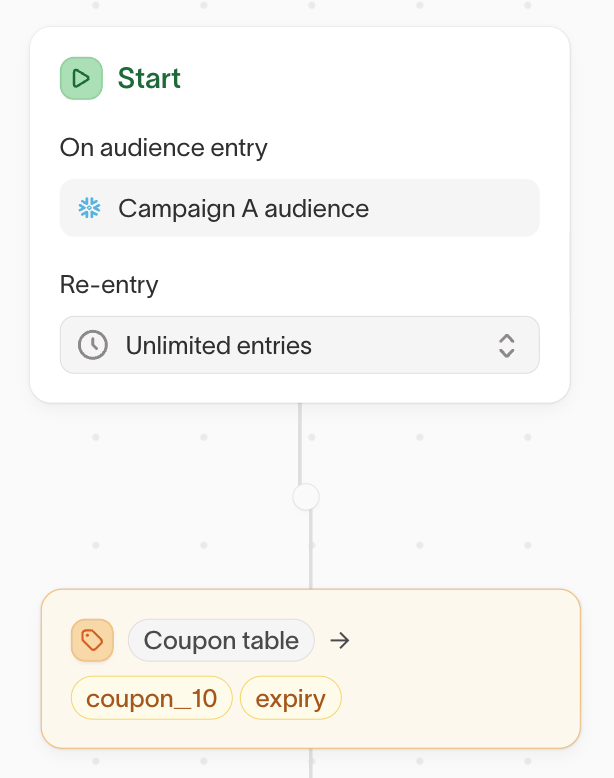
Coupon assignment runs only in audience-based journeys. The Assign coupon tile can appear on an event-triggered journey's canvas, but you can't save or activate an event-triggered journey that contains coupon assignment. To build an event-driven campaign, first build an audience from the event, then use that audience as the journey entry.
5. Add an Assign coupon step
Add an Assign coupon step to the canvas after the entry step. The step selects one row from the coupon pool for each member who reaches it.
Configure the step as follows:
- Select your coupon model as the Coupon source.
- (Optional) Add a Filter coupon pool condition to narrow the rows that can be assigned. For example, filter
campaign_idtosummer_winback_2026. - Choose the Assignment column. This is the unique value each member receives, such as
coupon_code. The column must contain unique text or number values. - Set a Display name. Hightouch uses this name for the journey variable and the label that appears in downstream syncs.
- (Optional) Under Additional columns, add metadata such as
expiration_dateordiscount_amount. Give each column its own display name. These columns don't need to be unique. - Select Preview results to check the matching rows and confirm that the pool has enough codes.
- Select Update to save the step.
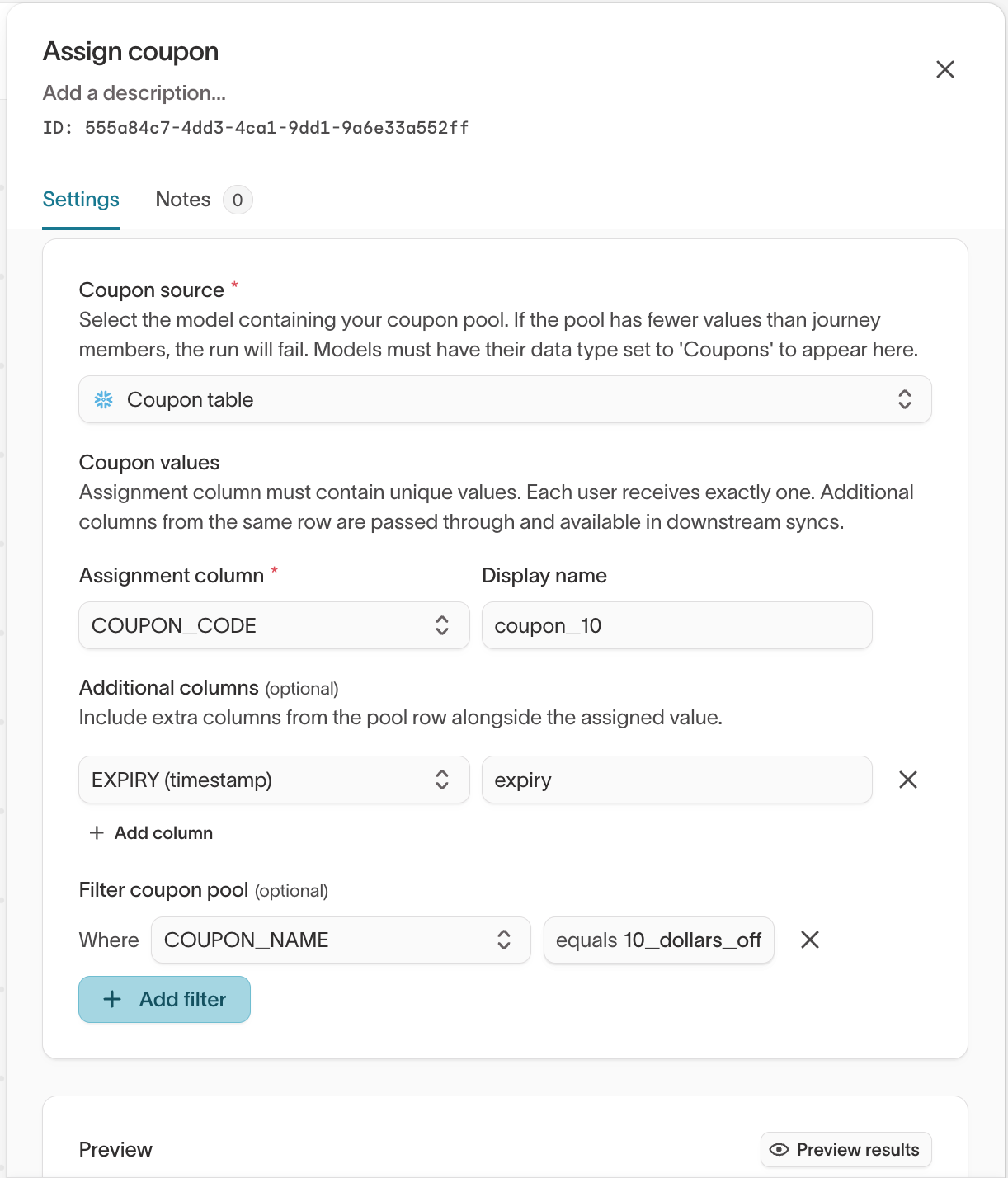
When a member reaches this step, Hightouch assigns a code and stores the code and any additional columns as journey variables. You can use these variables in later journey steps and in journey logs.
6. Sync the assigned values
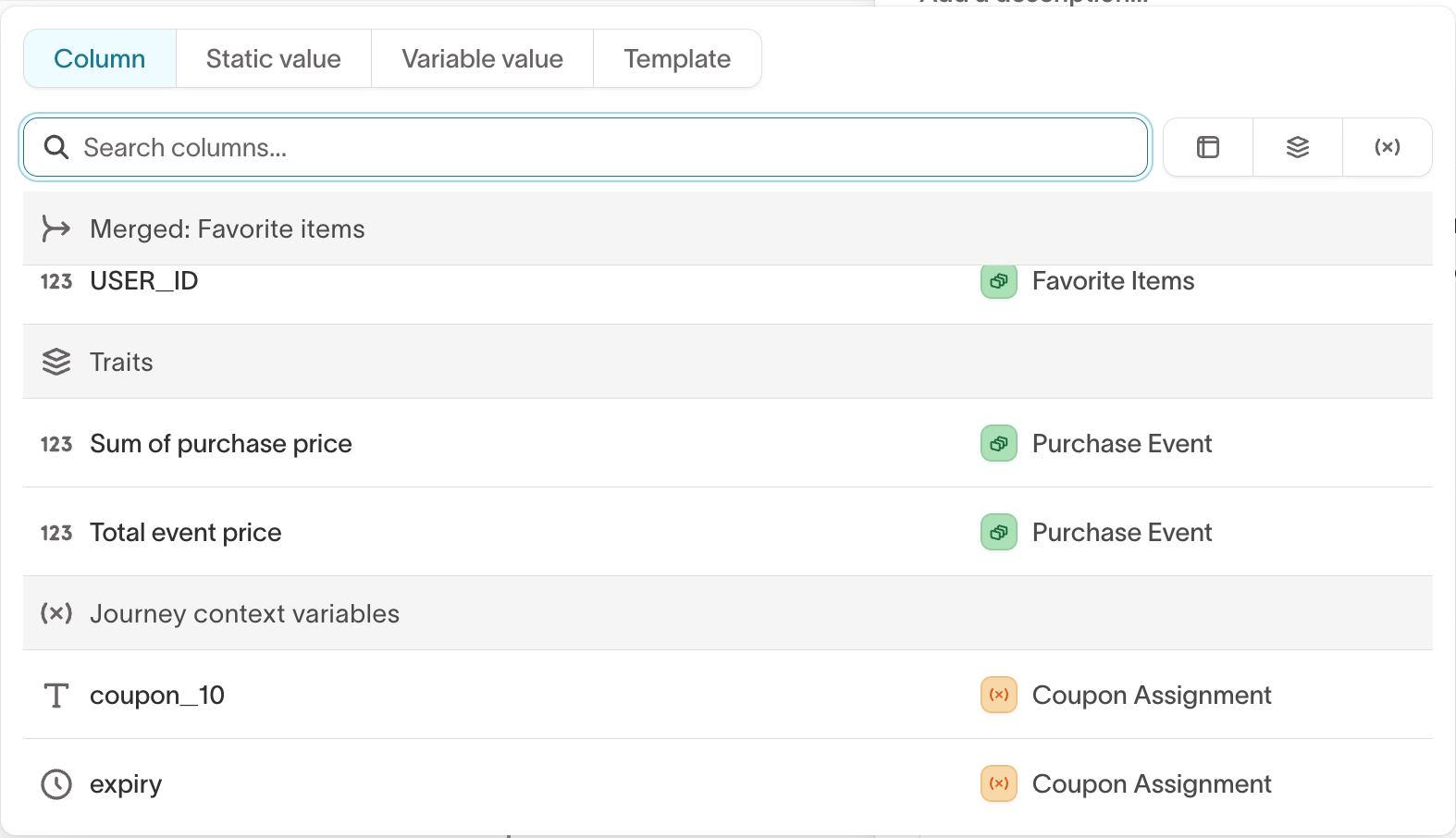
Add a Send to destination step to pass the assigned variables to a destination such as Braze or Salesforce Marketing Cloud. Map each journey variable to the destination field where you want to store or use it.
| Journey variable | Example destination field |
|---|---|
coupon_code | promo_code |
expiration_date | promo_expires_at |
discount_amount | promo_amount |
If the variables don't appear in the step, save the journey, then reopen it.
7. Test before launch
Test with a small audience and confirm the following:
- Each member receives a different
coupon_code. - Every assigned code is available and has not expired.
- The metadata matches the assigned coupon row.
- The destination receives the expected fields.
- Re-entering the same Assign coupon step reuses the original code.
Behavior and constraints
- Inventory: If a coupon pool has fewer available codes than the audience that uses it, the journey fails before sending. Keep more codes than members, and configure alerting for always-on journeys so you're notified when the pool is running low.
- Consistent assignment: A member keeps the same coupon and metadata when they re-enter the same step, even if the coupon table changes. To assign a different value, add a separate Assign coupon step with a non-overlapping pool.
- Expiration: Filter out expired and unavailable codes in the model or the pool filter so new members don't receive them. Hightouch preserves an existing assignment even if that code later expires.
- Separate pools across steps and journeys: Hightouch assigns a unique value to each member within one Assign coupon step. It doesn't deduplicate assignments across different steps or journeys. If two steps draw from overlapping rows in the same coupon model, the same code can be assigned twice. Partition the pool by
campaign_id, or use separate tables, so each step draws from non-overlapping rows.
Track assignments
Assignments are recorded in journey logs. Use the logs to map coupons to members or join assignments with redemption data for reporting. See Journey tables.
Next steps
- Journey tiles to configure the Assign coupon tile alongside other tiles.
- Create a journey to build the audience-based journey that assigns coupons.
- Send to destination tiles to send assigned values to a destination.