| Audience | Marketers and analysts who want to track campaign performance across email, ad, and SMS channels. |
| Prerequisites | A parent model with interaction models configured in your schema. See Campaign schema for setup steps. |
Overview
Campaigns is a reporting surface inside Intelligence that shows channel-level campaign performance in a single view. It has three tabs — Emails, Ads, and SMS — each showing metrics relevant to that channel.
Use Campaigns when you need to:
- View engagement and conversion metrics for email, ad, or SMS campaigns side by side.
- Apply attribution models to understand which touchpoints drive conversions.
- Filter and sort campaign data to compare performance across assets.
Which tabs appear depends on which interaction types you've configured in your schema. For example, configuring an Email Delivered interaction model enables the Emails tab.
Configure your view
All three channel tabs share the same configuration options. After selecting a parent model, use the controls below to customize what you see.
Select columns
Each tab has three categories of columns you can add to the table:
-
Asset columns describe the campaign content itself — attributes like created date, author, status, and campaign type. These come from the asset model in your schema.
-
Engagement metrics (Emails and SMS) or Asset metrics (Ads) show channel-specific activity. For Emails and SMS, these include sends, deliveries, opens, clicks, and unsubscribes. For Ads, these include cost, clicks, and impressions. These metrics are based on the interaction models and ad stats models in your schema.
-
Conversion metrics are based on metrics you've defined in the metrics layer and use the attribution model you've configured. Common conversion metrics include transactions, revenue, unique conversions, and product views. These can be derived from any customer event, both online and offline.
Apply filters
Filters let you narrow the view to specific campaigns or assets. You can filter on any visible column. Common filters include campaign name, campaign dates, or spend amounts. Both string-based and numeric filters are supported.
Time range
Campaigns has four default time ranges: 7 days, 14 days, 30 days, and 90 days.
The time range determines which conversions appear in the UI. It is separate from the attribution lookback window, which determines which touchpoints are eligible for attribution credit. Configure the lookback window in your attribution method.
Sort columns
You can sort columns alphabetically or numerically to reorder the table.
Save and share views
Save a view to revisit later or share with your team. A saved view captures the current filters, sorts, visible columns, and time range. Switch between saved views from the Views menu.
Channel details
While the configuration workflow is the same across all three tabs, each channel has different engagement metrics and schema requirements.
Emails
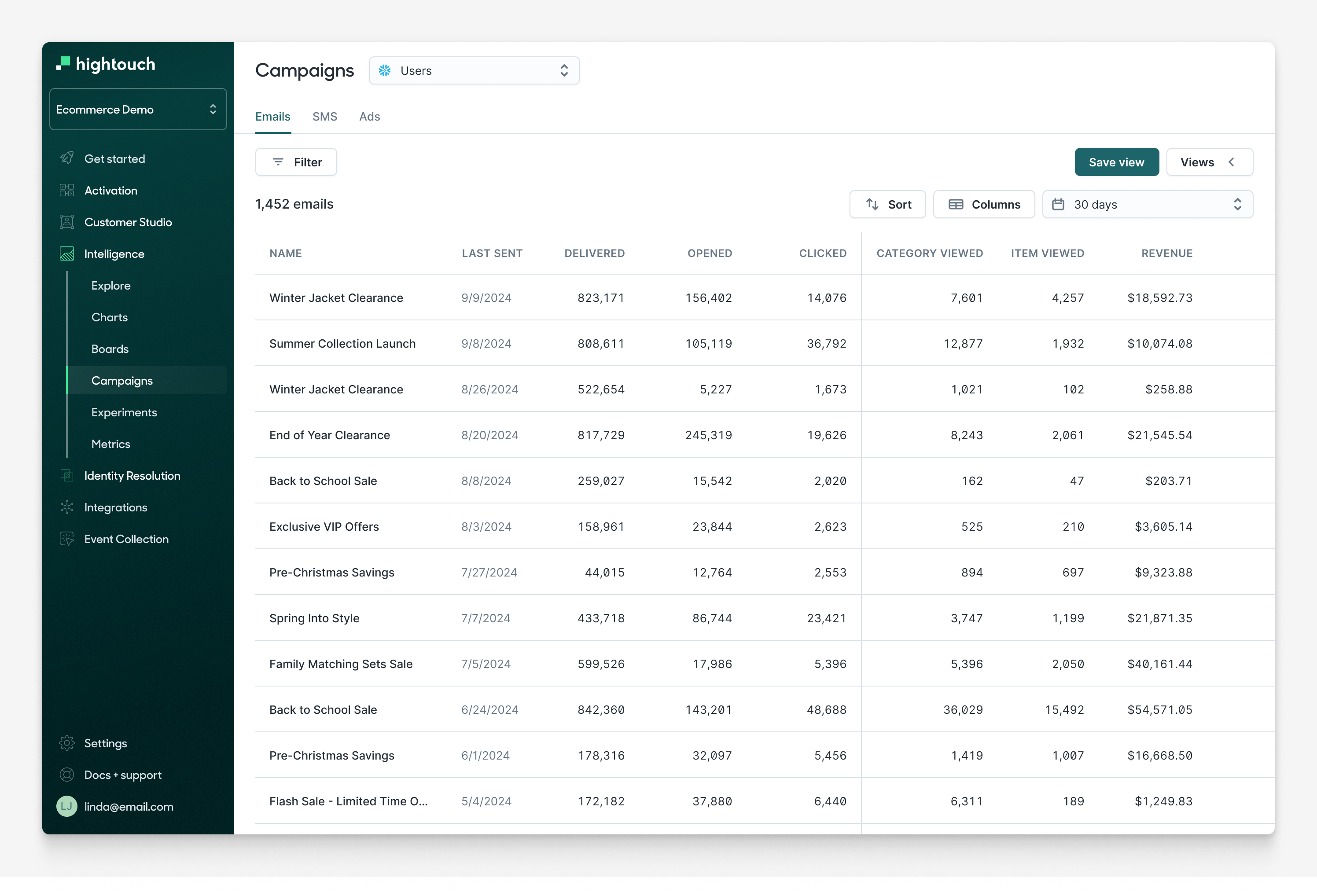
The Emails tab shows performance for email campaigns. Engagement metrics include sent, delivered, opened, clicked, click rate, unique clicks, and unsubscribed. These events are typically generated from tools like Iterable, Braze, SFMC, Klaviyo, or Attentive and loaded into your warehouse.
To enable the Emails tab, configure at least one email interaction type (such as Email Delivered or Email Clicked) on an event model in your schema. See Campaign schema for the full schema setup.
Ads
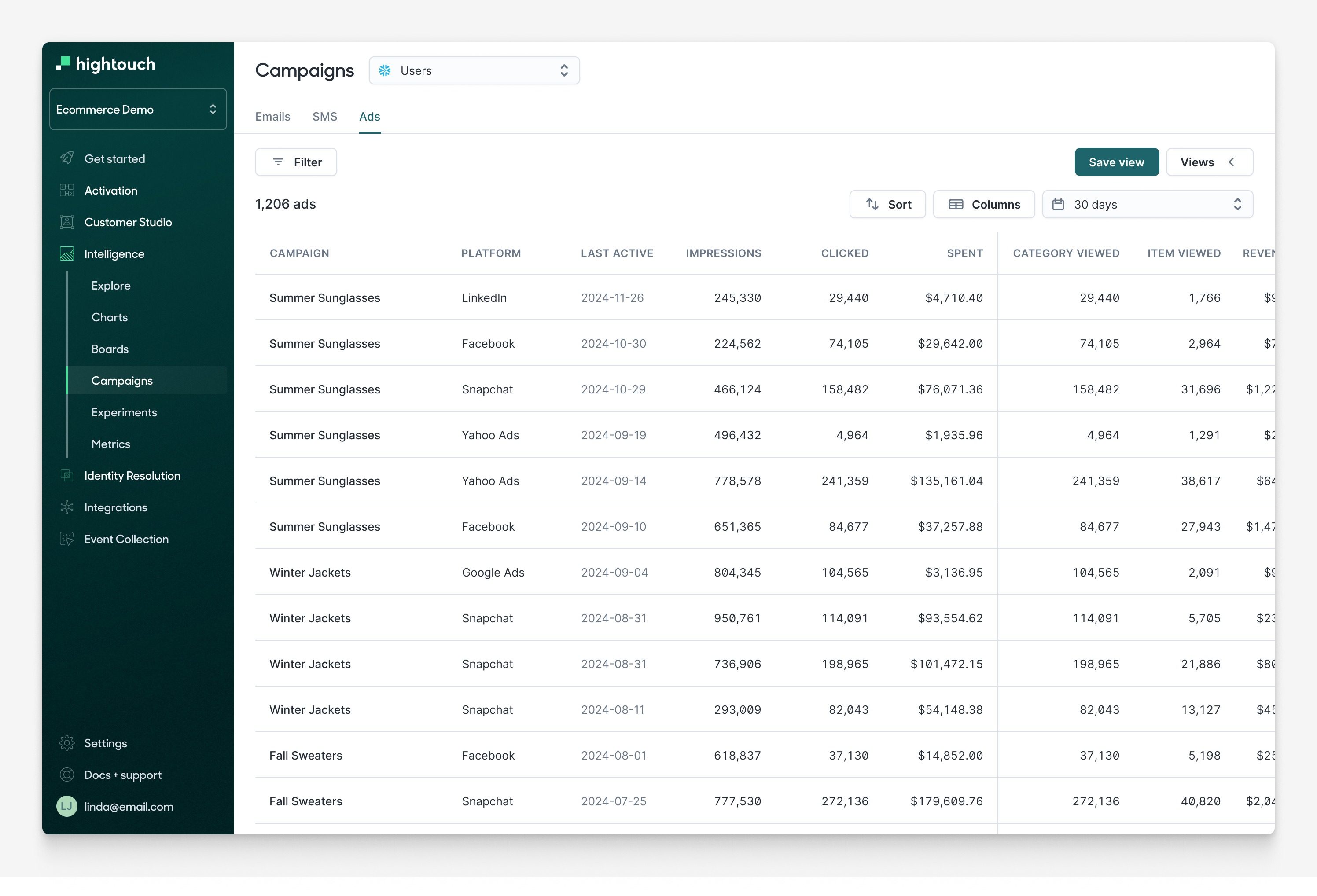
The Ads tab shows performance for ad campaigns across any ad platform. In addition to conversion metrics, you can report on platform-level metrics like ad spend and impressions.
Ad metrics come from an ad stats model in your schema, which typically follows the format of the dbt ad_reporting model. To enable the Ads tab, configure a Sessions interaction type on an event model in your schema.
SMS
The SMS tab shows performance for SMS campaigns. Engagement metrics include sent, delivered, clicked, replied, and opted out.
To enable the SMS tab, configure at least one SMS interaction type (such as SMS Sent or SMS Delivered) on an event model in your schema.