Overview
This guide explains how to configure experiment groups for AI Decisioning (AID).
Experiment group assignment determines whether a user receives:
treatment— AI-optimized messagingholdout— No campaign messaging for this use casecustomer_managed— Your existing business-as-usual messaging
To measure incremental lift accurately, every eligible user must be consistently assigned to one of these groups.
In most cases, Hightouch recommends using built-in group assignment within AI Decisioning. However, you can also assign groups in your warehouse or another testing platform if needed.
Choose the approach that best fits your implementation:
Why experiment group assignment is required
AI Decisioning uses incrementality-based measurement to determine whether personalized messaging drives additional conversions beyond what would have happened otherwise.
To measure lift accurately, users must be consistently assigned to:
treatmentholdoutcustomer_managed
Stable and unbiased assignment ensures:
- Valid experiment reporting
- Accurate performance comparisons
- No contamination between messaging strategies
Hightouch-assigned groups
In most cases, Hightouch recommends using native AI Decisioning functionality to assign experiment groups. This is configured directly in the Hightouch UI when you set up an agent.
When users qualify for an agent's audience, Hightouch assigns each user to a group by:
- Computing a deterministic, uniform hash of a stable user identifier plus a static experiment key ("salt")
- Taking the result modulo 100
- Mapping contiguous bucket ranges to configured percentages
(for example,
0–9= 10%holdout,10–29= 20%customer_managed,30–99= 70%treatment)
Although group assignment is evaluated daily when the AID job runs, deterministic hashing ensures users retain the same group once assigned.
This approach is randomized and independent of demographic or attribute bias. Assignments depend only on (user_id, salt) and do not rebalance over time. If percentage allocations change later, existing assignments remain stable and only marginal bucket ranges expand or contract.
Advantages
- Guaranteed group stability using proven randomization logic
- Simplified configuration for most implementations
Considerations
- Group assignments are evaluated daily when the AID job runs. If many new users enter the audience each day, users may briefly be eligible for customer-managed campaigns before suppression occurs.
- Group assignments must be synced to downstream tools. Suppression must be configured to ensure
holdoutandtreatmentusers do not receive customer-managed campaigns.
Hightouch-assigned groups setup steps
Prerequisites
- Initial schema configuration
Learn more about defining your schema
- Parent model with a unique primary key
- Related models configured
- Audience defined in Hightouch Learn more about building audiences
- Destinations configured for syncing group assignments to your ESP See setup instructions for Braze, Iterable, or SFMC
1. Set the holdout percentage
When you create a new agent, you set a holdout percentage. New agents default to a 20% holdout.
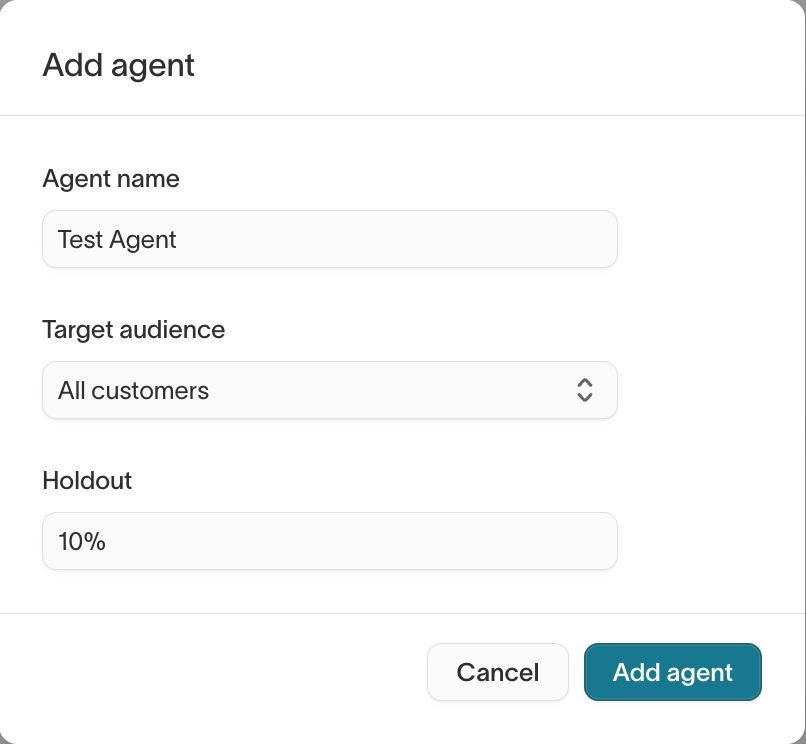
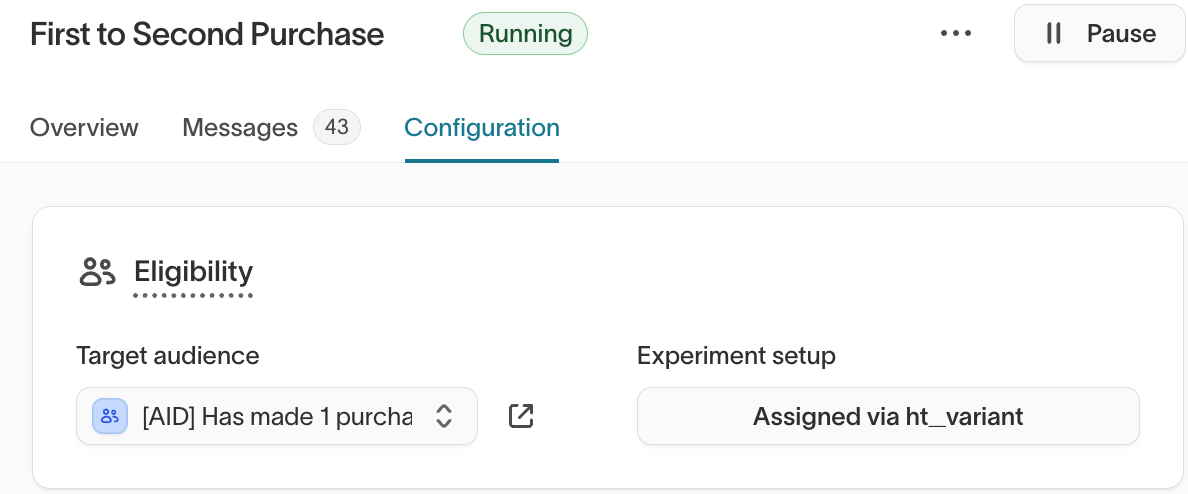
For live agents, you can view or modify the holdout percentage in the agent's Configuration tab.
If you chose to manage group assignment yourself in the data warehouse or via another tool, the source field can be referenced here instead of a raw percentage assignment.
2. Define the customer_managed percentage
During onboarding, you will work with your Hightouch account team to determine what percentage of users remain in your existing business-as-usual messaging strategy (customer_managed).
Your account team configures this in the agent.
3. Sync experiment group audiences downstream
Once group assignments have been generated, you need to sync them to your ESP so that each group can be targeted or suppressed appropriately.
Create audiences for each experiment group
In Hightouch, create separate audiences for the groups you need to action on downstream. At minimum, create audiences for:
customer_managed— Users who should continue receiving your existing campaignsholdout— Users who should be suppressed from all campaign messaging for this use case
You can also create a treatment audience if your ESP requires it for suppression or reporting, though treatment users are managed directly by the AID agent.
To create each audience:
- Go to Audiences in Hightouch
- Click Create audience
- Add a filter using the experiment group field from the group assignment table (joined as a related model on the agent's parent model)
- Set the condition to match the relevant group value (for example,
experiment = customer_managed)
Set up syncs to your ESP
For each audience, create a sync to your ESP:
- Go to the audience and click Add sync
- Select your ESP destination (for example, Braze, Iterable, or SFMC)
- Map the audience to a Cohort, Segment, or List in your ESP (terminology varies by platform)
- Set a sync frequency that aligns with your send schedule — for example, every time the AID job runs, or more frequently if users enter your audience at a high rate
Your Hightouch account team can help configure these syncs during initial setup. Once configured, they run automatically on the schedule you define.
4. Configure suppression
Suppress the holdout group and treatment group from your existing sends to ensure a valid experiment.
For example:
- Sync
holdoutandtreatmentusers to a Braze cohort - Use that cohort as suppression for all
customer_managedcampaigns
Where to access group assignments
Group assignments are stored in a table in your data warehouse and are:
- Used by the Hightouch UI to populate reporting
- Available as list memberships or user attributes in your ESP
Performance overview reporting supports breakdowns for:
treatmentcustomer_managedholdout
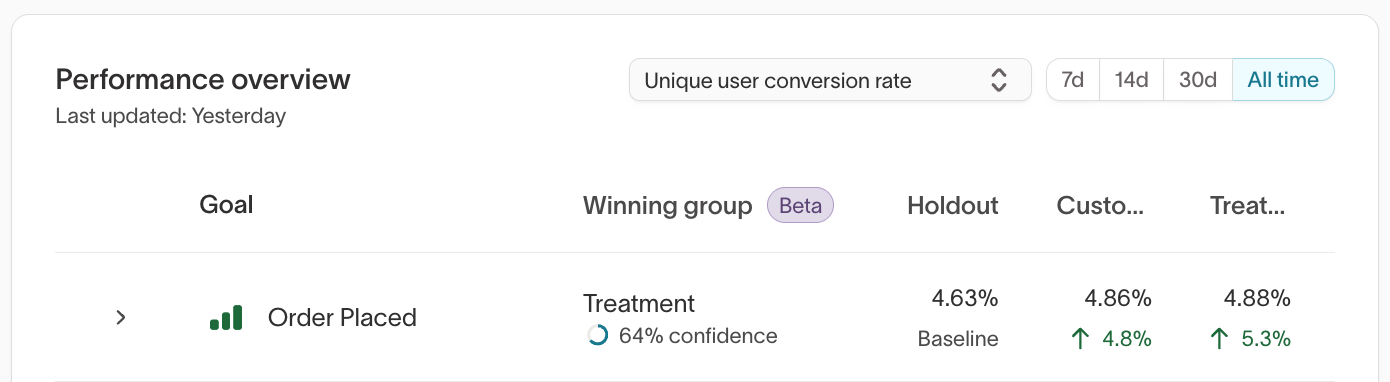
Experiment groups table in the warehouse
This table tracks which experiment bucket each user belongs to over time for a given agent (for example, AID treatment vs customer_managed vs holdout).
Example table name
hightouch_planner.de_user_experiment_groups_<agent_id>
Key columns
| Column | Type | Description |
|---|---|---|
user_id | string | User identifier (same as the agent's parent model) |
user_hash_number | integer | Stable hash used to assign users evenly |
experiment | string | Group label (treatment, holdout, customer_managed) |
first_seen_at | timestamp | First time user entered the AID audience |
last_seen_at | timestamp | Most recent time user was in the audience |
This table is typically used to:
- Build
customer_managedandholdoutaudiences - Slice reporting by experiment group membership over time
The group assignment table is pulled into the Schema:
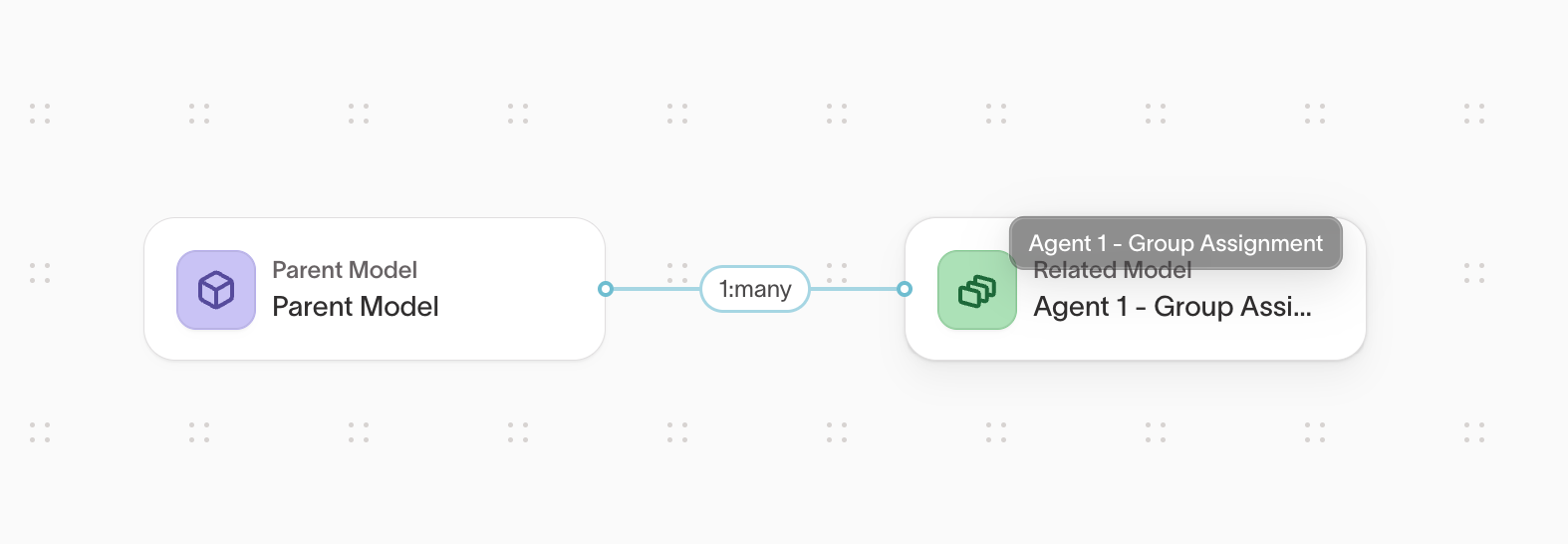
This table is automatically generated when using Hightouch-assigned groups. If you are assigning groups on your own, your related model field serves as the source of truth for experiment membership.
Externally-assigned groups
The following setup applies only if you manage group assignment outside of Hightouch.
SQL-based group assignment
You create a column in the agent's parent model using SQL to denote split group assignments.
Advantages:
- Enables you to use your existing experiment assignment infrastructure
- Allows for more frequent experiment group updates if your users enter the agent's parent model at high frequency and
customer_managedsuppression groups need to be updated more frequently than AID run frequency
Considerations:
- Requires careful SQL logic to ensure proper randomization and group stability
- Must preserve assignment stability when users re-enter audiences
Other tool-managed assignment
If you have a dedicated testing platform or leverage split capabilities within another tool, we can use the split assignments as long as they are populated into the data warehouse. Timing considerations must be taken into account here to ensure users are not eligible for an audience without having a split assignment.
Externally-assigned groups setup steps
Prerequisites
Before configuring group assignment, ensure the following are in place:
- Initial schema configuration See Define data schema
- A parent model with a unique primary key
- Related models configured
- An audience defined in Hightouch See Audiences
- Destinations configured for syncing group assignments to your ESP See destination setup docs
- Confirmation of your split group assignment, typically one of the following:
- 2-way split: 90% Hightouch AID
treatment, 10%holdout - 3-way split: 45% Hightouch AID
treatment, 45%customer_managed, 10%holdout
- 2-way split: 90% Hightouch AID
1. Create a related model for group assignment
Create a dedicated related model in your schema that deterministically assigns each user to a group.
Exact experiment group naming is required
Group values must exactly match:
treatmentholdoutcustomer_managed
These values are case-sensitive and cannot be renamed.
The following example shows a Snowflake SQL query that can be used directly in a related model to assign a 45 / 45 / 10 split.
-- Snowflake example
WITH bucketed_users AS (
SELECT
user_id,
-- Modulo 100 converts the hash into a uniform integer bucket from 0–99
-- Rotate the salt '1' to redistribute users in future experiments
ABS(HASH(CONCAT(user_id, '1'))) % 100 AS bucket
FROM parent_model_table
)
SELECT
user_id,
CASE
WHEN bucket < 45 THEN 'treatment'
WHEN bucket < 90 THEN 'customer_managed'
ELSE 'holdout'
END AS aid_agent1_assignment
FROM bucketed_users;
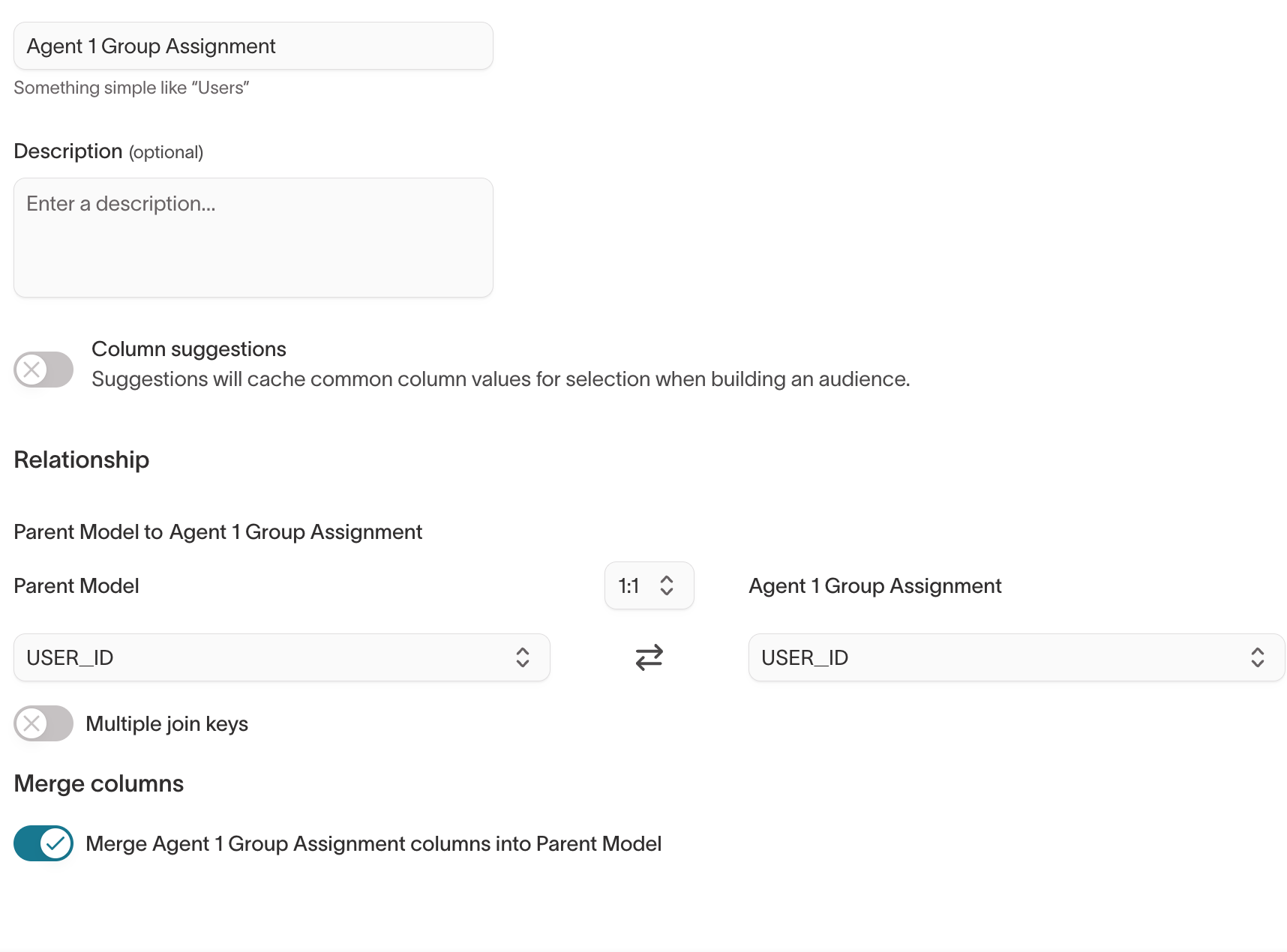
In your related model setup:
- Use
user_idas the join key - Set the relationship to
1:1 - Merge fields from the related model onto the parent model
This makes the group assignment available as a user-level attribute throughout Hightouch.
Example related model configuration
2. Create a Hightouch sync for the customer_managed audience
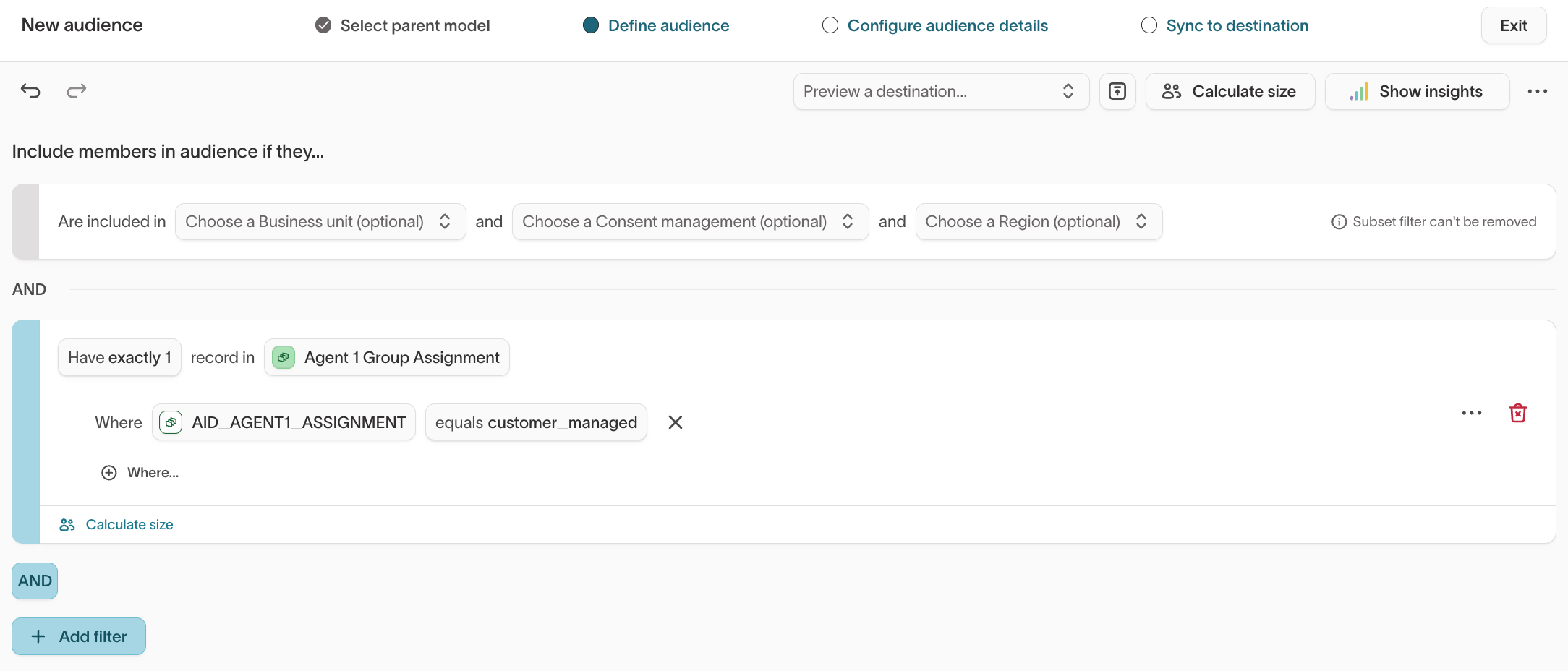
Create an audience that includes all users where aid_agent1_assignment = customer_managed (using the field name defined in the group assignment SQL).
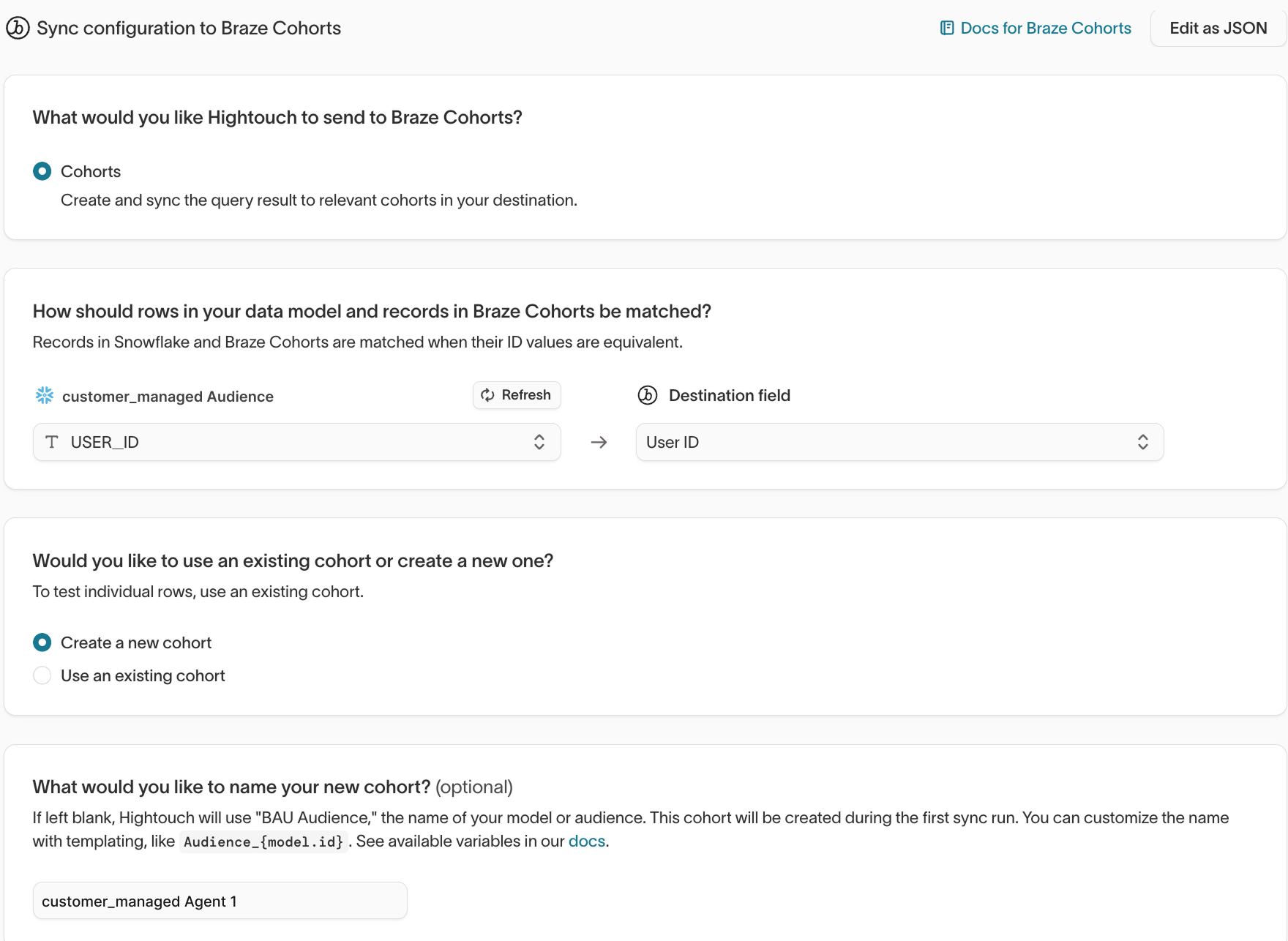
Set up a recurring sync to your ESP to populate an audience that will be used as a filter for customer_managed campaigns.
- Choose a sync frequency that fits your send schedule (for example, hourly)
- Ensure the audience stays up to date as users enter and exit eligibility
Ensure this audience is used as a qualification filter on all
customer_managed campaigns while the agent is live. Failing to suppress
treatment and holdout users from customer_managed campaigns will
invalidate experiment results.
Where are group assignments used in AID?
Your Hightouch account team will add the group assignment variant into your agent configuration.
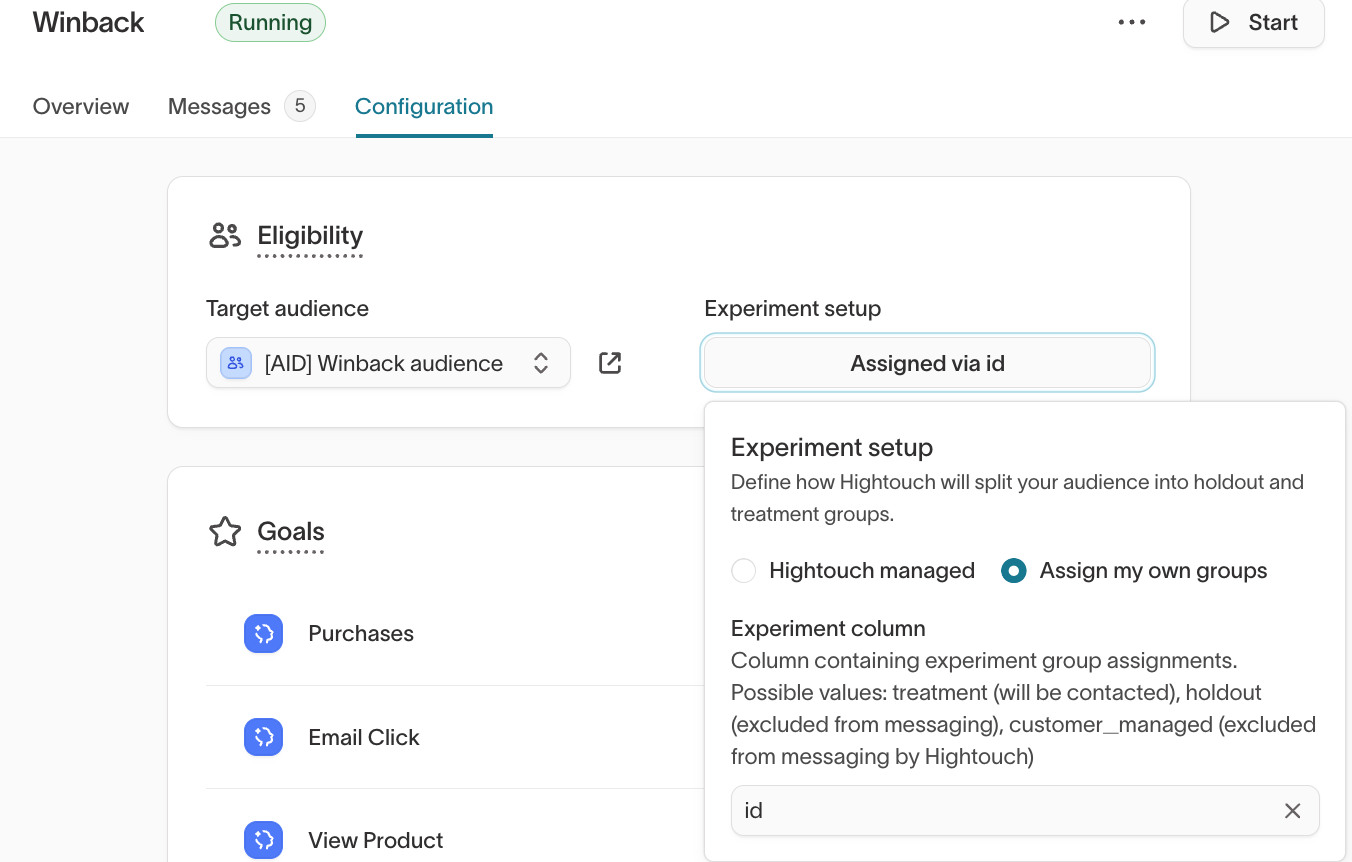
Group assignments are used in the Hightouch UI to automatically populate reporting.
Performance overview reporting supports breakdowns for:
treatmentcustomer_managedholdout
Frequently asked questions
Will Hightouch reporting match my other attribution?
While raw event counts will match when using the same source data, Hightouch reporting is incrementality-based and will not always align with attribution-based reporting in your ESP or other tools.
When you look at Hightouch incrementality reporting, we are not claiming full responsibility for every conversion. We are simply reporting the conversion rate for the group of users who received any treatment versus the conversion for users who did not. The result is a clear overview of whether the marketing efforts are effective and how much lift they drive.
What do treatment and holdout users actually receive?
-
treatmentAI-optimized messages (content and timing) from the agent. -
holdoutNo campaign messaging for that use case, but users are still tracked to observe organic behavior. -
customer_managedUsers in this group continue to receive your existing marketing messaging.
How does Hightouch assign users to treatment, holdout, and customer_managed?
When a user qualifies for an audience, Hightouch:
- Computes a deterministic hash of the user's stable ID and an experiment key
- Applies modulo 100 to create a bucket from
0–99 - Maps bucket ranges to groups (for example,
0–9=holdout,10–29=customer_managed,30–99=treatment)
This produces random, unbiased, and stable group assignments that never change for a given agent.
What happens if we change percentages later?
Changing split assignments only affects new users entering the audiences. Existing users remain in their original group. There is no re-randomization of users once a group is assigned.
What if users fall out of the audience and later re-enter?
Group assignment is deterministic. Users re-enter the same group they were originally assigned to.
What happens if I want to put all users in my treatment group?
Once you have established a high-performing agent, you can merge customer_managed users into the Hightouch treatment audience.
Contact your Hightouch account team to request this change. We do not recommend merging the holdout group and suggest maintaining at least a small holdout for ongoing measurement.