You’ve worked out a campaign with your AI assistant of choice. You know who you want to reach, what you want to say, and which offer you want to test. Now you need to turn that plan into something your marketing team can use.
That handoff can mean copying a brief into another tool, rebuilding an audience, and explaining the same context all over again.
Headless Hightouch connects those steps. Through Hightouch’s MCP server, you can work with Hightouch’s agents from the AI tools you already use. A conversation in your AI tool can lead to a saved audience, an analysis of campaign performance, or a set of ad creatives, using the capabilities enabled in your Hightouch workspace.
Your team chooses where to work. Hightouch brings the marketing capabilities into that workflow.
What does “headless” mean?
Headless means using Hightouch through another interface, rather than opening the Hightouch application for every step. You can still use Hightouch directly. It just doesn’t have to be where every request starts.
The connection uses Model Context Protocol, or MCP, an open standard that lets AI applications access information and take actions in other systems. Think of it as a two-way telephone between the AI tools you’re already using and Hightouch’s agents. We use MCP to connect external AI tools to our purpose-built marketing agents.
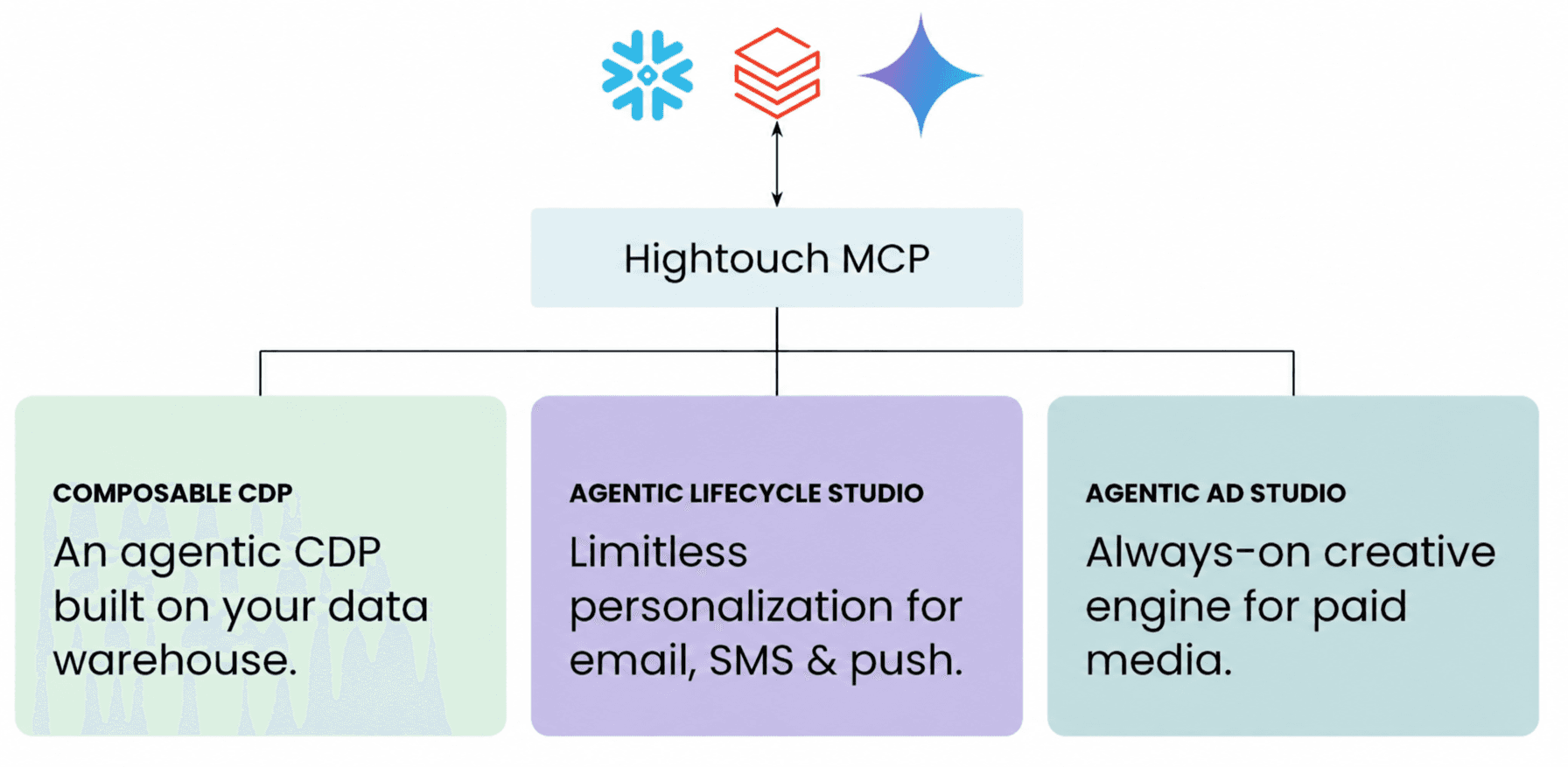
When you ask your assistant to build an audience, for example, this is not something most AI tools can natively do. Now, it can pass the request to Hightouch. Our agents work with the customer-data model and business context configured in your workspace, then return a result you can review, refine, and save.
Your team isn’t starting from a collection of basic tools and teaching a general-purpose assistant how to assemble a marketing workflow. You’re using Hightouch’s agents, with their marketing-specific skills and context, through another interface.
What can you do with it?
The supported MCP workflows depend on the Hightouch products and agent features enabled in your workspace. Here are a few practical places to start.
Build an audience and put it to work
“Build an audience of people who signed up in the last 30 days but haven’t made their first purchase.”
Review the audience definition, refine it with follow-up instructions, and save it to Customer Studio. With an existing sync template, you can also create a sync to send that audience to ad platforms such as Google Ads or Meta for a new-customer campaign. You’re actually creating an audience your team can use, not just getting advice about how to build one. You can also draft and save a journey around an audience or campaign goal.
Get answers from your customer and campaign data
“Which email campaigns drove the most conversions last quarter, and how did they compare to the quarter before?”
Hightouch’s agents can analyze the relevant data available through your workspace and help you explore the results. Ask follow-up questions, investigate a change in performance, or identify an audience worth targeting next.
Surface proactive insights
Headless workflows can also support a more proactive operating model, not just one-off questions. If your AI tool supports scheduled jobs or recurring workflows, you can configure it to check in with Hightouch each morning:
“What’s working in our X, Y, and Z campaigns, and what should we do differently to increase reach?”
That request can be routed through MCP to Hightouch’s agents, which use the customer and campaign data configured in your workspace to analyze performance and return recommendations to the AI tool or workflow that initiated the request.
Draft and refine lifecycle content
For Lifecycle Studio customers, the MCP supports building and iterating on email and SMS content.
“Draft an email for our cart-abandonment campaign, then create a shorter SMS version.”
You can refine the copy, tone, or email layout through conversation, keeping the campaign brief and the content work in the same flow.
Create on-brand ad creative
Ad Studio customers can generate visual ads from a brief, refine them with follow-up instructions, and browse existing projects.
“Create ads for our new card promotion, targeted at working adults in high-net-worth households.”
Review the results, ask for a different headline or visual treatment, and continue iterating without rewriting the brief in another tool.
Use Hightouch through your preferred AI platform
Hightouch connects to AI assistants such as Anthropic’s Claude and OpenAI’s ChatGPT, as well as the AI experiences from Snowflake, Databricks, and Google. Through MCP, your team can choose where to work without being tied to a single model provider or data platform.
Snowflake CoWork
Teams using Snowflake CoWork can connect to Hightouch through MCP to move from a conversation about Snowflake data to marketing work. A marketer can identify a group of customers in CoWork, then ask Hightouch’s agents to build an audience around those criteria. CoWork remains the conversational interface, while Hightouch provides the audience-building and activation capabilities behind it. Your Hightouch team can help enable MCP and confirm the configuration for your Snowflake environment.
Databricks Genie
For teams working on the Databricks lakehouse, Hightouch’s MCP lets Genie connect a customer-data conversation to an audience-building workflow. Ask for the audience you need, refine the result, and save it in Hightouch for your marketing team to use. Hightouch’s MCP server is listed in Databricks Marketplace. Look for “Hightouch MCP Server,” then work with your Hightouch team to enable access and configure the connection for your environment. The listing provides a way to discover the integration; your Hightouch product access and workspace setup still determine what you can do.
Google Gemini Enterprise
Teams using Gemini Enterprise can connect to Hightouch through a custom MCP connection. That brings supported Hightouch agent workflows into Gemini Enterprise, so marketers can work from the same interface they use for other AI-assisted tasks. There is also a separate Hightouch Marketing Agent for Gemini Enterprise. That experience focuses on audience building, journeys, and marketing analytics.
Anthropic Claude
Teams using Claude can connect to Hightouch through MCP. Start with a campaign idea in Claude, then ask Hightouch’s agents to build an audience using the customer data and business context configured in your workspace. Review and refine the result in the conversation, then save it to Hightouch.
OpenAI ChatGPT
Teams using ChatGPT can connect to the same Hightouch MCP server. Ask a question about campaign performance, explore the results with follow-ups, and use Hightouch’s supported audience-building or content-generation workflows to act on what you learn.
Grok & Grok Bot
Teams using Grok or Grok Bot can bring Hightouch into their workflows through MCP. Teams can ask Hightouch’s agents to analyze campaign performance or build an audience, then refine the result through conversation. Grok remains the interface, while Hightouch provides the marketing context and supported actions behind it.
Closing thoughts
Headless is an additional way to work. Start with an audience to build, a campaign question to answer, or a creative brief to develop. You don’t need to move your entire marketing workflow to get value from the connection.
Use your preferred AI assistant when it’s convenient, and Hightouch directly when you want its visual tools or configuration controls. In the Hightouch application, you can review and manage saved work, configure data connections and sync templates, and maintain workspace settings and brand context.
Your choice of interface doesn’t change your permissions. MCP operations are scoped to your authenticated Hightouch workspace and respect your existing role-based access controls. Because the connection can take actions as well as read information, keep your team’s review process in place before activating audiences or publishing content.
To get started, ask your Hightouch team to enable MCP for your workspace. MCP access itself has no additional charge. The underlying Hightouch product and agent-usage requirements still apply.
Read the MCP setup guide or talk to Hightouch to get started.